
Sending Group Messages from Salesforce (Linq for Salesforce)
With Linq for Salesforce, you can start and manage iMessage group conversations directly from the Salesforce UI. This keeps your team in one place while still meeting customers where they are—on their phones.
What Is a Group Chat in Linq?
A group chat is a single conversation that includes:
-
One Linq phone number
-
Two or more end recipients
-
All messages, GIFs, voice memos, and media shared with the group
Everyone in the group sees replies in the same thread, just like a normal iMessage group on an iPhone.
Requirements
-
Linq for Salesforce package installed and configured
-
At least one active Linq Phone line connected
-
Contacts/Leads with valid mobile numbers that support iMessage or SMS
-
Access to the Linq Messages utility item in Salesforce
Where to Find Group Chats in Salesforce
Group conversations live inside the Linq Messages utility:
-
Open the Sales (or relevant) app in Salesforce.
-
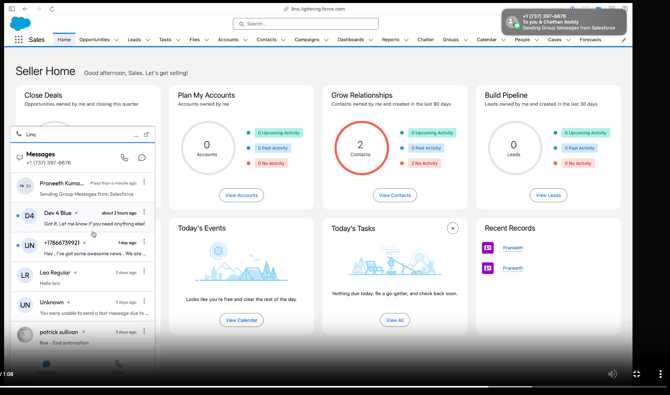
At the bottom-left utility bar, click Linq to open the Messages panel.
-
You’ll see:
-
A list of recent conversations in the message pane
-
Existing group chats are labeled by participant names at the top of the conversation.
Starting a New Group Message
-
Open the Linq Messages utility.

-
Click the New Message / compose icon.
-
In the Recipients field:
-
Search for and select the first Lead or Contact.

-
Add one or more additional recipients (each will appear as a chip/pill in the recipient list).
-
-
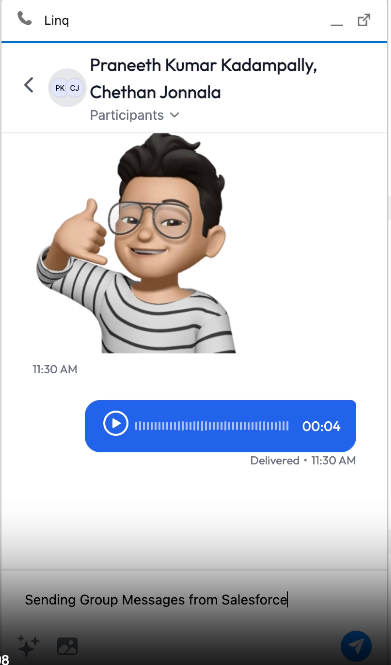
Type your message in the Text Message · iMessage input box.
-
Click the Send (paper airplane) button.
A new iMessage group conversation is created with all selected recipients, and the thread appears in your Messages list.
Sending Media in Group Chats
Inside an existing group thread you can send:
-
Text messages
-
GIFs / images (from your computer or supported pickers)
-
Voice memos (using the audio icon in the composer)
-
Emojis and reactions (where supported)
Anything you send appears to all group participants and is also visible in the Salesforce Linq Messages panel.