
Using Linq Actions in HubSpot Workflows
You can use Linq directly inside HubSpot Workflows to send SMS and email messages as part of your automation. Linq currently provides workflow actions, not workflow triggers.
This article explains where to find Linq in HubSpot workflows and what each Linq action does.
Where to Find Linq in Workflows
-
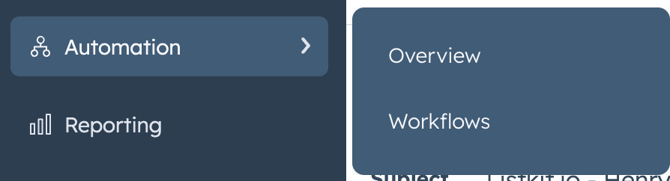
In HubSpot, go to Automation → Workflows.
-
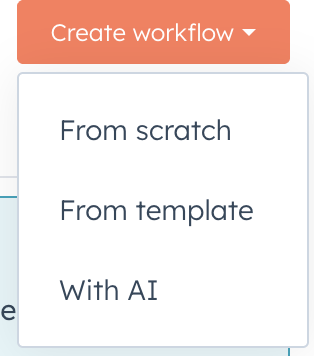
Click Create workflow (or open an existing one).
-
Choose From scratch, then configure your enrollment trigger as usual.
-
In the workflow editor, click the + icon to add an action.
-
In the left panel, scroll down to Integrated apps.
-
Click Linq to see all available Linq actions.
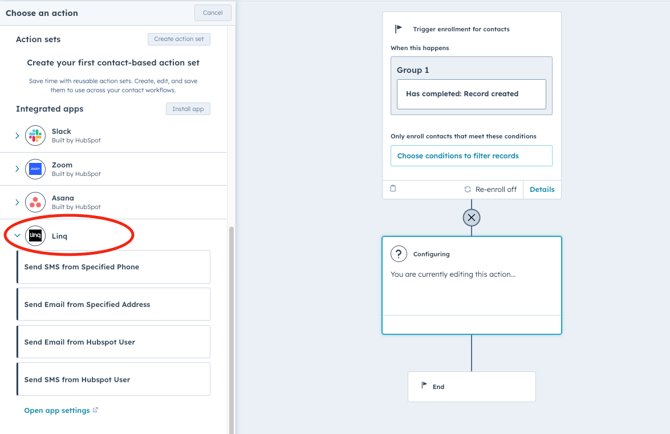
From here, you can select the action you want to use.
Available Linq Workflow Actions
1. Send SMS from Specified Phone
What it does:
Sends an SMS/iMessage from a specific Linq phone number to the enrolled contact.
Common uses:
-
Appointment reminders
-
One-off promotions
-
Onboarding or nurture sequences
Key inputs:
-
From Number – select a specific Linq phone line
-
To Number – usually a contact phone property (e.g.,
Phone numberorMobile phone number) -
Message – the text message content (can include personalization tokens, like contact first name)
2. Send Email from Specific Address
What it does:
Sends an email through Linq from a specific sending address you’ve configured.
Common uses:
-
Transactional or operational emails (order updates, confirmations)
-
Automated follow-ups that shouldn’t come from an individual rep
Key inputs:
-
From Address – choose a configured email address
-
To Address – typically the HubSpot contact’s email
-
Subject & Body – email subject line and body content
3. Send Email from HubSpot User
What it does:
Sends an email from the HubSpot owner (or another user field) associated with the contact—great for scalable outreach that still feels personal.
Common uses:
-
Sales follow-up that “comes from” the account owner
-
Check-in emails from a CSM/PSM at key lifecycle stages
Key inputs:
-
HubSpot User – choose which user field to use (e.g.,
Contact owner) -
To Address – typically the contact’s email property
-
Subject & Body – can use personalization tokens for rep name, company, etc.
4. Send SMS from HubSpot User
What it does:
Sends an SMS/iMessage from the Linq number associated with a HubSpot user (for example, the contact owner’s Linq line).
Common uses:
-
Owner-based text outreach
-
“Your rep” reminders (demos, onboardings, renewals)
Key inputs:
-
HubSpot User – usually
Contact owneror another user field -
To Number – contact phone property
-
Message – SMS content, optionally with personalization tokens