Smart Number Assignment in GoHighLevel (GHL)
Overview
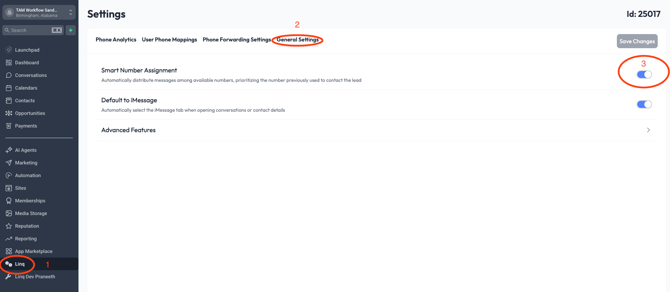
Smart Number Assignment is a GoHighLevel (GHL) feature that allows your team to automatically route and display the correct phone number when communicating with contacts through the GHL CRM.
When you’re using a Linq Blue number for iMessage + calling, Smart Number Assignment ensures your Linq Blue number is used correctly for outbound caller ID, while still matching each contact to the right routing number inside GHL.
This helps maintain:
-
Consistent communication
-
Accurate tracking
-
Better deliverability
-
A unified customer experience
What Smart Number Assignment Does
Smart Number Assignment automatically selects the best phone number for your outbound messages and calls in GHL based on:
-
The inbox the conversation belongs to
-
The number the contact used most recently
-
The routing rules for your sub-account
-
Your team’s dedicated number (ex: your Linq Blue number)
With this turned on:
-
Your Linq Blue number appears as Caller ID during outbound calls
-
GHL automatically knows to use your iMessage-enabled line for text conversations
-
You avoid mismatched numbers, inconsistent caller IDs, and routing issues
Benefits:
Smart Number Assignment ensures:
-
The Linq Blue number is always chosen when sending iMessage-enabled messages
-
Outbound caller ID always shows your Linq Blue business number
-
GHL doesn’t accidentally switch to a LeadConnector or system-generated number
-
All replies return to one centralized inbox
This prevents issues like:
-
Customers seeing different numbers at different times
-
Messages coming from generic LeadConnector numbers
-
iMessages failing due to mixed routing
-
Missed replies
⚙️How to Enable Smart Number Assignment in GHL
Follow these steps inside your GoHighLevel account:
1. Log Into Your GHL Sub-Account
Make sure you're inside the sub-account where your Linq Blue number is connected.
2. Navigate to:
Linq-General Settings-Toggle on Smart Number Assignment