
Sending iMessages in GoHighLevel with Linq
With the Linq + GoHighLevel integration, you can send and receive iMessages directly from the Conversations screen—right alongside SMS, WhatsApp, and other channels.
This article walks through how to select iMessage as the channel when messaging a contact.
Prerequisites
Before you can send iMessages from GHL:
-
You have an active Linq Blue subscription.
-
Your Linq integration is connected in GoHighLevel and authenticated in Linq Admin.
-
The contact’s phone number is an iPhone number (iMessage-capable).
How to Send an iMessage in GoHighLevel
-
Open the conversation
-
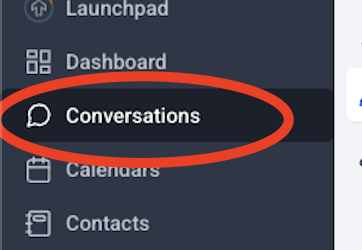
In GoHighLevel, go to Conversations.
-
Select the contact or thread you want to reply to.
-
-
Open the channel selector
-
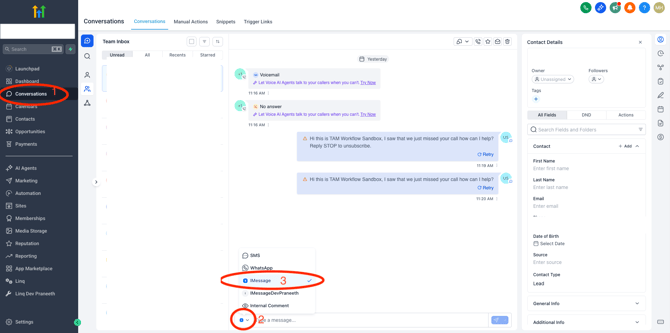
At the bottom of the conversation, above the message box, click the channel dropdown (it may say SMS by default).
-
-
Choose “iMessage”
-
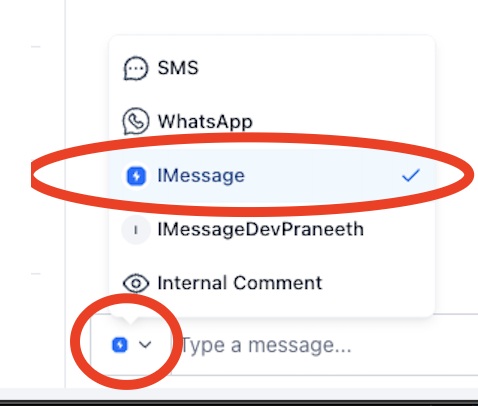
From the list of channels, click iMessage.
-
You’ll see the iMessage icon and label appear as the selected channel.
-
-
Type and send your message
-
Type your message in the text field.
-
Click the Send button (paper airplane icon).

-
The message will send over iMessage and appear in the thread like any other message.
-
What You’ll See
-
Blue chat bubble – indicates an iMessage sent via Linq Blue.
-
Messages appear in the same conversation timeline with other channels, but tagged with the iMessage channel and the correct Linq number.