
📱 What Is Hyper? — Overview of Linq’s Enhanced Contact-Sharing Experience
Hyper is Linq’s upgraded tap experience that gives your connections a faster, more seamless way to view your Linq page and save your contact information—especially on iPhone.
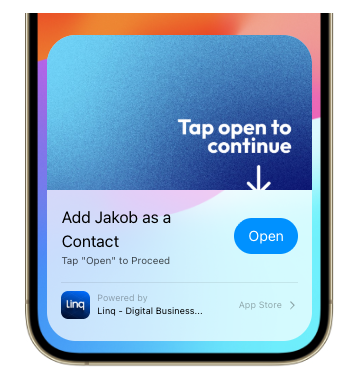
Hyper uses Apple’s App Clip technology to deliver a smoother and more powerful workflow than standard NFC products.
✨ What Makes Hyper Different?
Hyper products unlock features that standard Linq products can’t offer:
1. Faster Contact Saving (iPhone Only)
Hyper connects directly with the iOS Contacts app.
With Auto-Download enabled in Hyper Settings, saving a contact becomes:
-
Tap the Card/Scan QR code
-
Tap Open
- Tap Save
-
Tap Done
That’s it. Just a few taps for the end user.
Standard (non-Hyper) NFC requires more steps due to iOS restrictions—Hyper removes almost all friction.
2. Enhanced Page Viewing
When someone taps your Hyper card, they get:
- A smoother, app-like interface via the App Clip
This makes your page feel more polished and professional.
3. Optional Follow-Up Notifications
Hyper allows you to send automatic follow-up push notifications to the person who tapped your card.
These can be used to:
-
Remind them to finish saving your contact
-
Bring them back to your Linq page
-
Keep you top-of-mind
Notifications automatically stop after 48 hours (Apple-mandated limit).
4. App Clip Technology
Hyper uses an Apple App Clip—a lightweight, temporary version of the Linq app that installs instantly when tapped.
App Clips allow:
-
Faster contact saving
-
Push notifications
-
Quick interactions without installing the full app
📌 Hyper vs. Standard Linq Products — Quick Comparison
| Feature | Hyper | Standard Linq |
|---|---|---|
| Tap → iOS contact integration | ✅ Yes | ❌ No |
| Tap → App Clip experience | ✅ Yes | ❌ No |
| Auto-download contact | ✅ Yes | ❌ No |
| Full-screen Linq page | ✅ Yes | ❌ No |
| Push notifications | ✅ Yes | ❌ No |
| Instant page reassignment | ⚠️ Limited (Apple delay) | ✅ Always instant |
| Supported on Android | Standard experience | Standard experience |
⚠️ Important Note About Page Switching
Because Hyper involves Apple’s App Clip caching:
-
Hyper cards are not ideal to switch between multiple pages frequently.
-
Apple may cache the original page temporarily before showing changes.
Standard Linq products can be switched instantly without delay.
🎨 What Can Be Customized on a Hyper Card?
You can modify:
Physical Product
-
The printed design (applies to Hyper Custom Cards)
Digital Hyper Settings
Inside the Linq app:
-
Page preview image
-
Page preview subtitle
-
Auto-Download contact toggle
-
Follow-up notification messages
📱 What Happens for Android Users?
Android devices do not use App Clips.
They simply receive the standard Linq experience, which still works normally.
🧠 Summary
Hyper is the best experience Linq offers for fast, frictionless sharing—especially with iPhone users. With App Clips, push notifications, instant contact saving, and a clean full-screen interface, Hyper elevates your networking experience while still remaining fully compatible with standard Linq features.
If you want help choosing between Hyper and standard products, we’re always here to guide you.